XHTML, XML and XSLT
XHTML – EXtensible HyperText Markup Language
- is HTML defined as an XML application
- is a stricter and cleaner HTML
- is compatible to HTML 4.01 and supported by all browsers
- is a W3C recommendation
Why XHTML ?
- the following, “bad” html document will work fine in most browser even if it does not follow HTML rules:
<html> <head> <body> <p>a paragraph…<br> <a href=“#”>test </html> - but browsers running on hand-held devices (e.g. mobile phones) have small computing power and can not interpret “bad” markup language
- HTML is designed to structure (and display) data and XML is designed to describe and structure data
- XHTML specifies that everything must be marked up correctly
XHTML – base syntactic rules
- XHTML elements must be properly nested
<b><i> Italic and bold text </b></i>
<b><i> Italic and bold text </i></b> - XHTML elements must always be closed
<p> A paragraph…
<br>
<img src=“foo.jpg”>
<p> A paragraph…</p>
<br />
<img src=“foo.jpg” />
- XHTML elements must be in lowercase
- XHTML elements must have one <html> root element (which contains a <head> and a <body>)
XHTML – other syntactic rules
- attribute names must be in lower case
- attribute values must be quoted
<table width=300px>
<table width=“300px”> - the “id” attribute replaces the “name” attribute
- XHTML DTD defines mandatory elements
- attribute minimization is forbidden
<input checked>
<input disabled>
<input checked=“checked” />
<input disabled=“disabled” />
General format of an XHTML document
<!DOCTYPE html PUBLIC "-//W3C//DTD XHTML 1.0 Transitional//EN"
"http://www.w3.org/TR/xhtml1/DTD/xhtml1-transitional.dtd">
<html>
<head>
	<title>…</title>
</head>
<body>
	…
</body>
</html>
- <!Doctype>,<html>,<head>,<title>,<body> are mandatory
DTD – Document Type Definition
- a DTD specifies the syntax of a document written in a SGML language (HTML, XHTML, XML)
- it specifies:
- the hierarchical structure of the document
- element names and types
- element content type
- and attributes names and values
- XML 1.0 has 3 DTDs: Strict, Transitional and Frameset
DTD example (internal to XHTML file)
<!DOCTYPE course [
<!ELEMENT course (lecture+)>
<!ELEMENT lecture (title,bibliography,notes,examples)>
<!ELEMENT title (#PCDATA)>
<!ELEMENT bibliography (#PCDATA)>
<!ELEMENT notes (#PCDATA)>
<!ELEMENT examples (#PCDATA)>

<!ATTLIST course professor CDATA #REQUIRED>
<!ATTLIST course title CDATA #REQUIRED>
<!ATTLIST course yearofstudy CDATA #REQUIRED>
<!ATTLIST course date CDATA #IMPLIED>
]>
XHTML validation
- a valid XHTML document is an XHTML document which obeys the rules of the DTD specified by the <!Doctype> tag.
- the official W3C XHTML validator:
http://validator.w3.org/check/referer - XHTML DTD is split in 28 modules
XML – eXtensible Markup Language
XML – eXtensible Markup Language
- is a markup language designed for storage and transport of data
- describes syntax and semantics of data, while HTML/XHTML describes only syntax of data
- is a markup language for structuring and self-describing data (not for formatting data); HTML/XHTML is for structuring and formatting/displaying data
- is a meta-language, a language used to create other markup languages (XHTML, XSLT, RDF, SMIL etc.)
- does not have predefined tags; these are defined by users
- is easy readable by both humans and machines
- is plain text, software and hardware independent
- is a W3C recommendation
XML Document example
<?xml version=“1.0”?>
<collection>
	<book category=“Networking”>
		<title>High Performance TCP Networking</title>
		<author>Raj Jain</author>
		<isbn>567-78960</isbn>
		<editor>Prentice Hall</editor>
	</book>
	<book category=“Databases”>
		<title>Transactional Information Systems</title>
		<author>Gottfried Vossen</author>
		<author>Gerhard Weikum</author>
		<isbn>680-71060</isbn>
		<editor>Morkan Kaufman Publishing</editor>
	</book>
	<book category=“Mathematics”>
		<title>Mathematical Encyclopedia</title>
		<author>Eric Weistein</author>
		<isbn>545-678450</isbn>
		<editor>Addison Wesley</editor>
	</book>
</collection>
XML usage on the web
- XML’s popularity as a format for storing and interchanging data is high and increasing on the web
- because is self-describing it is more easily understood by different incompatible systems which interchange data and also reduces complexity of parsing it by different machines (computers, hand-held devices, news readers etc.)
- because it is plain text it copes very well with platform upgrades (e.g. hardware, operating system, application, framework)
- is a competitor of relational databases for storing data on the web => semi-structured databases (more structured than plain text, but less structured than relational databases)
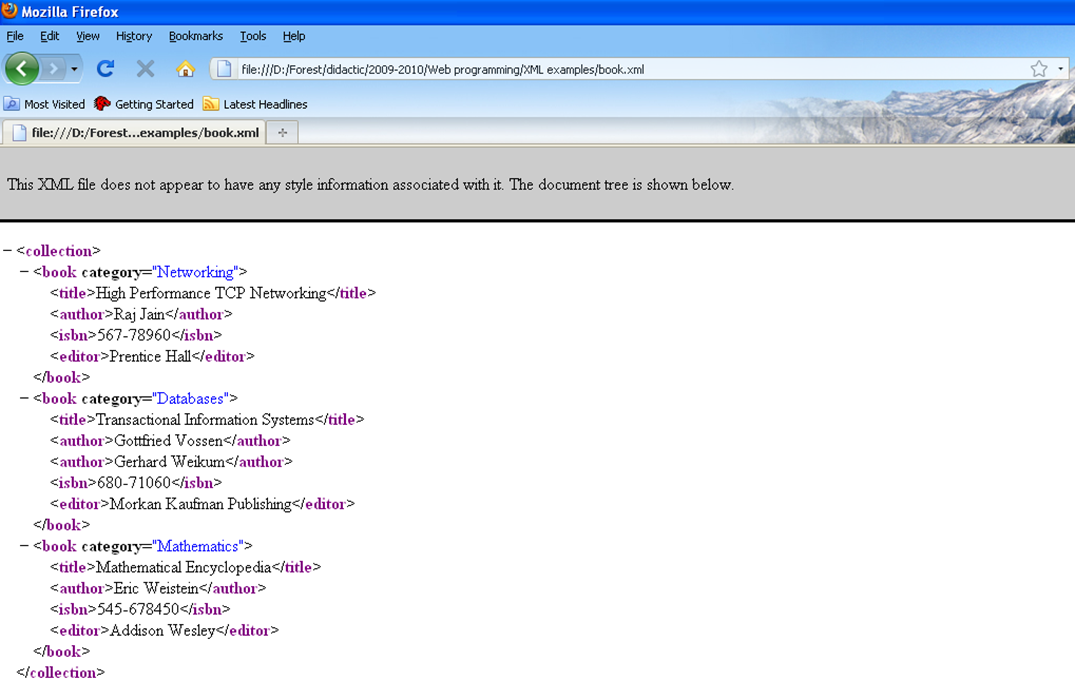
The tree structure of an XML document
- an XML document has a tree structure which is implicitly displayed in the browser viewing the document:
XML – syntactic rules
- all XML elements must have a closing tag
- XML elements are case-sensitive
- XML elements must be properly nested, not overlap
- XML documents must have only one root element which is the parent of all elements; “<?xml?>” is not part of the document itself
- values of XML attributes must be quoted
- characters “<“ and “&” are illegal in XML; use predefined entity references (“<” – “<“, “>” – “>”, “&” – &, “'” – “ ‘ “, “"” – “ “ “)
- comments in XML: <!-- … -->
- white-space is preserved in XML (not like HTML)
- XML stores newline as LF (Line Feed)
XML elements
- XML does not have predefined tags
- an XML tag can have any name respecting the following rules:
- can contain letters, numbers and other characters
- can not start with a number or punctuation character
- can not start with the letters xml (or XML or Xml etc.)
- can not contain spaces
- an XML tag can contain text and other nested tags
- an XML tag can also have attributes
XML well-formedness and validation
- well-formed XML – an XML document compliant to XML syntactic rules
- valid XML – an XML document compliant to a DTD or XML Schema
- a DTD can be specified inside the XML document after the “<?xml?>” tag or it can be specified in a separate file and referenced in the XML file by:
<!DOCTYPE collection SYSTEM “collection.dtd”> - an XML Schema is an alternative to a DTD and can be referenced in the XML file using attributes of the root tag:
<collection xmlns=http://www.cs.ubbcluj.ro
xmlns:xsi=http://www.w3.org/2001/XMLSchema-instance
xsi:schemaLocation="http://www.cs.ubbcluj.ro collection.xsd">
A DTD for the collection.xml document
<!ELEMENT collection (book+)>
<!ELEMENT book (title,author+,isbn,editor)>
<!ELEMENT title (#PCDATA)>
<!ELEMENT author (#PCDATA)>
<!ELEMENT isbn (#PCDATA)>
<!ELEMENT editor (#PCDATA)>

<!ATTLIST book category CDATA #REQUIRED>
A schema for the collection.xml document
<?xml version="1.0"?>
<xs:schema xmlns:xs="http://www.w3.org/2001/XMLSchema">
<xs:element name=“collection">
  <xs:complexType>
        <xs:sequence>
		   <xs:element name=“book">
	           <xs:complexType>
       			   <xs:attribute name=“category” type=“xs:string” />
		           <xs:sequence>
		               <xs:element name=“title" type="xs:string"/>
		               <xs:element name=“author" type="xs:string“
								minOccurs=“1” maxOccurs=“10” />
		               <xs:element name=“isbn" type="xs:string"/>
		               <xs:element name=“editor" type="xs:string"/>
      			   </xs:sequence>
  			   </xs:complexType>
		   </xs:element>
	    </xs:sequence>
  </xs:complexType>
</xs:element>
</xs:schema>
XML Schema
- XML Schema Definition (XSD) is the successor of DTDs
- like a DTD, an XSD defines:
- the elements which appear in the XML doc and their attributes
- the order/hierarchical structure of these elements
- the number of child elements of a specific type
- whether the element is empty or it has content
- default and fixed values for elements and attributes
- additional to DTDs, XSDs:
- support basic data types (e.g. numerical, date, string etc.)
- support namespaces (for solving collisions)
- use XML syntax
XML Namespaces
- in XML users define tags; when integrating 2 different xml applications, tag conflicts can appear
- XML Namespaces try to solve name conflicts
- ex. of an XML doc with name conflicts:
<document>
<studies>
		<year_of_study name=“1”>
			<group>211</group>
			<group>212</group>
		</year_of_study>
		<year_of_study name=“2”>
			…
		</year_o_study>
</studies>
<courses>
		<group name=“Databases”>
			<course>Relational Databases</course>
			<course>Database Systems Fundamentals</course>
		</group>
		<group name=“Operating Systems”>
			…
		</group>
</courses>
</document>
XML Namespaces (2)
- Xml doc with prefix namespaces:
<document>
<st:studies  xmlns:st=“http://www.cs.ubbcluj.ro/studies”>
		<st:year_of_study name=“1”>
			<st:group>211</st:group>
			<st:group>212</st:group>
		</st:year_of_study>
		<st:year_of_study name=“2”>
			…
		</st:year_o_study>
</st:studies>
<co:courses  xmlns:co=“http://www.cs.ubbcluj.ro/courses”>
		<co:group name=“Databases”>
			<co:course>Relational Databases</co:course>
			<co:course>Database Systems Fundamentals</co:course>
		</co:group>
		<co:group name=“Operating Systems”>
			…
		</co:group>
</co:courses>
</document>
XML Namespaces (3)
- the namespace for a prefix must be defined using the xmlns attribute
- xmlns attribute can be placed in any tag (and it will be valid for that tag and all its children) or in the root tag like this:
<document xmlns:st=http://www.cs.ubbcluj.ro/studies
xmlns:co=“http://www.cs.ubbcluj.ro/courses”> - each namespace URI should be unique and should not necessary point to a page containing namespace information
- the default namespace for the document is introduced by the xmlns attribute:
<document xmlns=“http://www.cs.ubbcluj.ro”>
XML Viewing
- if an XML document has errors (i.e. it is not well-formed), it will not be displayed in a browser as opposed to HTML which will be displayed if it has errors (the XML W3C standard specifies that an XML parser should stop when an error is found)
- the default display of an XML browser is its tree structure, because XML does not contain display/formatting information
- an XML can be displayed differently (formatted) using CSS or XSLT
Formatting XML with CSS
- CSS files are referenced in an XML file using the tag:
<?xml-stylesheet type=“text/css” href=“book.css”?> - the book.css file:
book {							title {
	display: block;	                    display: inline-block;
	border-bottom-style: solid;	        width: 30%;
	border-bottom-width: 1px;           background-color: #ccefef;
	width: 80%;	                        padding-right: 5px;
	margin-left: auto;          }
	margin-right: auto;
}                               isbn {
                                        display: inline-block;
author {                                width: 15%;
	display: inline-block;              border-left-style: solid;
	width: 15%;                         border-left-width: 1px;
	border-left-style: solid;           padding-left: 5px;
	border-left-width: 1px;     }
	padding-left: 5px;
}
editor {
	display: inline-block;
	width: 20%;
	border-left-style: solid;
	border-left-width: 1px;
	padding-left: 5px;
}
XPointer and XLink
- XPointer defines a standard way of referencing various objects inside an xml document
href="http://www.example.com/cdlist.xml#id('rock').child(5,item)" - XLink defines a standard way of creating hyperlinks in XML documents
<homepage xlink:type="simple"
xlink:href="http://www.w3schools.com">Visit W3Schools</homepage>
XSLT – eXtensible Stylesheet Language Transformations
What is XSL?
- XSL (eXtensible Stylesheet Language) was developed by the W3C because of a need for an XML-based stylesheet language
- in HTML each tag is predefined and it already contains some default display information in its name, so it is easy to format it using CSS; in XML each tag can mean anything, so it is harder for XSL to format a tag
- XSL consists of:
- XSLT – language for transforming XML documents
- XPath – language for navigating inside XML documents
- XSL-FO – language for formatting XML documents
What is XSLT?
- XSLT if used for transforming an XML document in another XML document
- XSLT is the most important part of XSL
- XSLT can add/remove elements and attributes to an XML document, can rearrange and sort them, can hide or display elements
- XSLT uses XPath for parsing the XML document
XSLT example
<?xml version=“1.0”?>
<xsl:stylesheet version=“1.0“ xmlns:xsl="http://www.w3.org/1999/XSL/Transform">
<xsl:template match="/">
<html>
  <body>
  <h2>A Book Collection</h2>
  <table border=“1”>
		<xsl:for-each select=“collection/book”>
    		<tr>
      	         <td><xsl:value-of select=“title”/></td>
	         	 <td><xsl:value-of select=“author”/></td>
		         <td><xsl:value-of select=“isbn”/></td>
	         	 <td><xsl:value-of select=“editor”/></td>
    		</tr>
        </xsl:for-each>
  </table>
  </body>
</html>
</xsl:template>
</xsl:stylesheet>
- an XML file can be linked to an XSLT by specifying:
<?xml-stylesheet type=“text/xsl” href=“book.xsl”?>
<xsl:template>
- syntax:
<xsl:template match=“XPath expression”>…</xsl:template> - meaning: it builds a template and associates this template with an XML element/tag
- the match attribute associates the template with a specific XML element
- <xsl:template match=“/”> matches the root element of the XML document
<xsl:value-of>
- syntax:
<xsl:value-of select=“XPath expression” /> - meaning: it extracts the value (content) of the selected node (specified by the select attribute)
- example:
it selects the value of the current “title” element, which is a child of “book”, which is a child of “collection”<xsl:value-of select=“collection/book/title” />
<xsl:for-each>
- syntax:
<xsl:for-each select=“XPath expression”>…</xsl:for-each> - meaning: it selects each XML child node of the node specified by the select attribute
- examples:
it selects the “title” and “author” nodes which are children of all “book” nodes from a “collection” node1) <xsl:for-each select=“collection/book”> <xsl:value-of select=“title” /> <xsl:value-of select=“author” /> </xsl:for-each>
it filters the selection using a value for the content of a book node2) <xsl:for-each select=“collection/book[title=“Operating Systems”]>
<xsl:sort>
- syntax:
<xsl:sort select=“XPath expression” /> - meaning: it sorts the output inside a <xsl:for-each> element on the value specified by the select attribute
- example:
<xsl:sort select=“title” />
<xsl:if>
- syntax:
<xsl:if test=“expression”> … output in case the expression is true … </xsl:if> - meaning: it adds a conditional test in the processing flow; the expression can contain the operators:
- = (equal)
- != (not equal)
- < (little than)
- > (greater than)
- example:
<xsl:if test=“title=‘Operating Systems’”>…</xsl;if>
<xsl:choose>
- syntax:
<xsl:choose> <xsl:when test="expression"> ... some output ... </xsl:when> <xsl:otherwise> ... some output .... </xsl:otherwise> </xsl:choose> - meaning: is used for multiple conditional testing