Server-side Java for the web
-
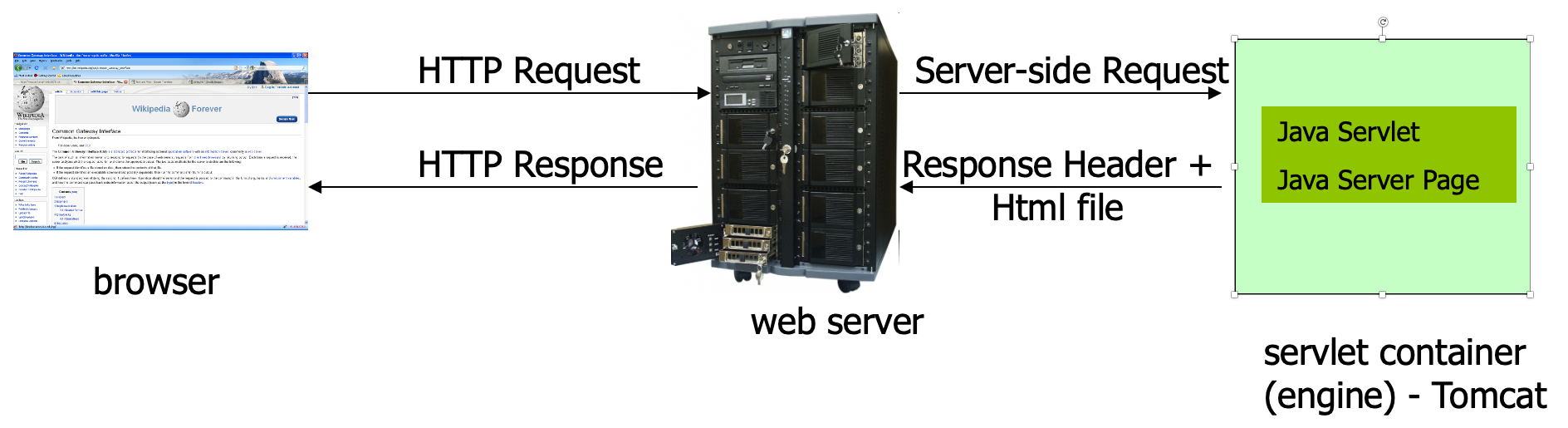
a servlet is a Java program which outputs an html page; it is a server-side technology
First java servlet
       import java.io.*;
       import java.util.*;
       import javax.servlet.*;
       import javax.servlet.http.*;

       public class FirstServlet extends HttpServlet {
           public void doGet(HttpServletRequest request, HttpServletResponse response)
                                                            throws IOException, ServletException {
               response.setContentType("text/html");
               PrintWriter out = response.getWriter();
               out.println("<html>");
               out.println("<head>");
               out.println("<title>First servlet</title>");
               out.println("</head>");
               out.println("<body>");
               out.println("It works...<hr>");
               out.println("</body>");
               out.println("</html>");
           }
       }
What is a java servlet ?
-
a java servlet is a java class extending HTTPServlet class
-
a java servlet class overrides the doGet(), doPost() or other equivalent HTTP method and (usually)
prints at the standard output an html file
-
a java servlet class can contain any kind of java code the JDK can compile
-
a java servlet class needs to be compiled prior to using it; it must use servlet-api.jar
Apache Tomcat
-
the most well known servlet/jsp container
-
is a web server + implementation of Java Servlet and JSP (Java Server Pages) APIs
-
is developed by Apache Software Foundation
-
available at http://tomcat.apache.org/ under
Apache Software License
Installing Tomcat
-
Download the binary zip distribution (e.g. apache-
tomcat-6.0.20.zip) in a local folder (we will use c:\temp
in the rest of the guide)
-
Set the environment variables JAVA_HOME=path_to_JDK_installation_folder
CATALINA_HOME=path_to_tomcat_installation_folder
either as Windows system variables or in the files
startup.bat and shutdown.bat from the bin directory
E.g. place the following lines in the beginning of startup.bat and shutdown.bat:
       set JAVA_HOME=c:\progra~1\java\jdk1.6.0
       set CATALINA_HOME=c:\temp\apache-tomcat-6.0.20
Starting/shutting down Tomcat
Tomcat standard folders
-
bin - contains executable files for controlling the
server (start, shut down etc.)
-
conf - contains configuration files; most important
server.xml for configuring the server and web.xml a general configuration file for web applications
-
lib - libraries (jars) used by tomcat and deployed web
applications
-
logs - log files
-
temp - temporary files
-
webapps - contains the web applications deployed
-
work - contains files created by tomcat during running
(e.g. it crates a servlet from each jsp file)
Format of a web application
-
web applications are stored in the webapps folder, either as a folder or as a .war archive
-
a web application (either a folder or a .war archive) must contain the following:
-
WEB-INF folder
-
WEB-INF\web.xml: a configuration file
-
optionally the WEB-INF folder can contain the following subfolders:
-
classes: which contain servlets
-
lib: which contains jars used by the web
application
-
html, jsp and resource files can be placed anywhere in the web application home folder
-
servlets must be placed in the folder or subfolders of WEB-INF\classes
A very simple web.xml example
    <?xml version="1.0" encoding="ISO-8859-1"?>

    <web-app xmlns="http://java.sun.com/xml/ns/javaee"
             xmlns:xsi="http://www.w3.org/2001/XMLSchema-instance"
             xsi:schemaLocation=http://java.sun.com/xml/ns/javaee http://java.sun.com/xml/ns/javaee/web-app_2_5.xsd version="2.5">

    </web-app>
What is a Java Server Page (JSP)
-
an html file containing parts of java code; the java code is placed inside the "<% ... %>" tags or some other related tags
-
Tomcat will create a servlet from the jsp file (which will be saved in the work folder)
-
when the jsp is requested the servlet is executed and the output of the server is sent back to the
client
First JSP file
    <html>
        <body>
        <%
            out.println("First JSP... It works<br/>");
        %>
        </body>
    </html>