Javascript & DOM
Javascript is the most used programming language in 2020 according to Github and Stackoverflow and maintains top positions on other top charts.
Javascript – main properties
- is a lightweight scripting language (language used to control the browser) that is run on the client-side (browser)
- developed by Netscape and Sun Microsystems and introduced first in the Netscape Navigator 2.0
- is intended to add interactivity and dynamic functionality to HTML pages
- is interpreted, not compiled, inserted directly in HTML pages
- is an object-oriented language that inherits many features from Java, but it is not Java
- is understood by most browsers
- is an event-based language, weakly typed
- current standard version is ECMAScript 2020 (ES11), but browser conformance is ECMAScript 2015 (ES6) -2016 (ES7)
What can Javascript do ?
- it can detect the type of browser
- it can react to various events of the browser
- it can alter the structure of the html document (modify, delete, add tags on the run-time)
- it can validate data before being sent to the server
- it can not modify local (client) files
Base elements of Javascript
- Js inherits from Java simple data types, operators, instruction syntax
- Js has predefined objects: DOM-related and general objects: Array, Boolean, Date, Error, EvalError, Function, Math, Number, Object, Range Error, ReferenceError, RegExp, String, SyntaxError, TypeError, URIError
- Js has some global functions (not related to objects): decodeURI, decodeURIComponent, encodeURI, encodeURIComponent, eval, isFinite, isNaN, parseFloat, parseInt
- comments: // or /*…*/
- Js is weakly-typed: a variable can be bound to a specific type, then to a different type, during the course of a program execution
Types and literals (constant values)
- Number: integer (in base 2, 8, 10, 16) and real
- Boolean: true and false
- null
- undefined: a variable that does not have an assigned value;
- NaN: not a number
- String (unicode chars): 'text', "something", `text1` etc.; methods of the string class can be applied on any string literal (e.g. "sir".length); `` can span over multiple lines
- vectors: ['a', , , 'bbb', 'ccc'] will have 5 elements
- objects: lists of zero or more pairs "property : value"
ex.: dog = {name: dog, type: animal, characteristics: getProps("dog"), age: 4}
null and undefined
- null – a value representing the absence of a value (like null in Java and C++
- undefined – a value of a variable that hasn't got a value yet
- Ex.:
var x = null; // null
var y;        // undefined
Variables
- loosly-typed language:
- a variable can be bound to different types during its lifetime;
- the value of a variable is automatically converted to other types when necessary
- the type of a variable needs not be declared
- a variable is declared with var or let or just by assigning a value to it:
var name; root="some text"; i = root+1; // i="some text1" let x = 2; - let variables have block scope and var or no var (i.e. variables declared without var, just by assigning a value to it) variables have global scope (if declared outside a function) or function scope (if declared inside a function)
Variables (cont.)
- a variable without a value assigned to it will be evaluated to undefined or NaN (depending on the context) if it was declared with var or will give a run-time error if it was not declared with var
- a variable is global (decl. outside any function) or local to a function or has block scope (if declared with let )
- function variables:
var f = function(a, b) {
        return a+b;
}
f(2, 3); // calling the function
Constants
- declare entities that don't change value
- the scope of a constant is block-level
- Ex:
const z = 10;
const s = "web";
s = "programming";	 // throws error !
Operators
- 3 types of expressions in Js: arithmetic (eval. to a number), string and boolean (eval. to true or false)
- assign operators: =, +=, -=, *=, /=, %=, <<=, >>=, >>>=, &=, ^=, |=
- comparison operators: ==, !=, >, >=, <, <=
- arithmetic operators: %, /, ++, --, +, -, ** (power)
- bitwise operators: &, |, ^, ~, >>, <<, >>>
- logic operators: &&, ||, !
- string operator: + (concatenation)
- special operators
Special operators
- identity operators: === (eguality and of the same type), !== (not equal and/or of different types)
- ternary operator: condition ? true-expr : false-expr
- comma: expr1, expr2, …, exprN
- new: creates a new object
- this: refers to the calling object in a method
- typeof: typeof("test") => string
- delete: deletes an object or a property from an object or an element from a vector
- in: propNameorNumber in objectName
- instanceof: objectName instanceof objectType
- void: evaluates an expression without returning a value
Automatic type conversion system (implicit type coercion)
- when applying operators, javascript automatically convert parameters to the same type, depending on the context:
a = "string"+2;	       → "string2"
b = 2+"3"		→ "23"
c =2+true		→ 3
d = "string"+false	→ "stringfalse"
[]==0			→ true
10-"1"			→ 9
Instructions (borrowed from Java)
- conditional: if, switch
"falsy values": false, undefined, null, 0, NaN, "" - loop: for, do while, while, label, break [label], continue [label]
- for (variable in object) { ... statements ...} : cycles through the properties of an object
- for (variable of object) { ... statements ...} : "for...in" cycles over property names, "for...of" iterates over property values:
- with (object) { ... statements ... } : sets the default object for a set of statements
- exception handling instructions:
try { ... statements ... } catch (exception) { ... } throw expression;
For cycles over arrays
var a = [ 'x', 'y', 23 ];
a.Test = "foo";
for (i=0; i<a.length; i++) {
	console.log(a[i]);
}  	// will print: x, y, 23
for (var i in a) {
	console.log(i);
}	// will print: 0, 1, 2, test
for (var i of a) {
	console.log(i);
} 	// will print: x, y, 23
a.forEach(function(elem) { console.log(elem); });  // will print  x, y, 23
Strings
- are sequences of Unicode chars (each char is 1 or 2 UTF-16 code units)
- are objects which have methods:
- charAt(index): return character from index
- concat(str): concatenate "str" to this string
- includes(str): searches "str" in this string
- startsWith(str), endsWith(str): check if this string starts/ends with
- indexOf(char): index of char in this string
- match(regex): check if regular expression matches this string
- replace(what, replaceWith): replace in this string
- search(str): search string
- slice(beginIndex, endIndex): extract subsection of this string
- split(separator): return an array of strings by splitting this string
Collections (creation and iteration)
- Creating arrays
var array1 = new Array(2, 3, 5); var array2 = Array("abc", "de", "fghij"); var array3 = [0, "abc", 2]; var array4 = new Array(arrayLength); var array5 = Array(arrayLength); - Array.length is the highest index + 1 (NOT the number of elements!)
var a = [ 1, 2, 10];
a[20] = 11;
console.log(a.length); // will print 21
Collections (Array methods)
- concat(): joins two arrays and returns a new array
- join(delimiter = ','): joins all elements of an array into a string
- push(): adds one or more elements to the end of an array and returns the resulting length of the array.
- pop(): removes the last element from an array and returns that element
- shift(): removes the first element from an array and returns that element
- slice(startIndex, uptoIndex): extracts a section of an array and returns a new array.
Collections (Array methods; cont.)
- splice(index, countToRemove, addElement1, addElement2, ...):removes elements from an array and (optionally) replaces them. It returns the items which were removed from the array
- reverse(): transposes the elements of an array, in place: the first array element becomes the last and the last becomes the first. It returns a reference to the array
- sort(): sorts the elements of an array in place, and returns a reference to the array
- indexOf(searchElement[, fromIndex]): searches the array for searchElement and returns the index of the first match
- forEach(callback[, thisObject]): executes callback on every array item and returns undefined
- map(callback[, thisObject]): returns a new array of the return value from executing callback on every array item
eval()
- eval(string) – if string is an expression, evaluates the expression and if string is a sequence of javascript statements, it executes those statements
- Ex:
eval("2+3")   	 → 5
a=2; eval("a+4") → 6
eval("var x=2; console.log(x);")  → create global variable x=2
                                    and print 2 on the console
Functions
In Javascript, functions are first class citizens:
- they can be saved in variables
- they can be passed as parameters
- they have properties, like other objects
- they can be defined without an identifier
Functions
- usually they are declared in the tag and called all over the html file
- the syntax of declaring a function is:
where parameters represent specific parameters sent to the function, arguments contain a variable number of arguments; the variable arguments can be accessed inside the function through arguments[i],where i goes from 0 to arguments.lengthfunction name_fct(parameters, arguments) { ... statements ... } - all primitive parameters are passed to the function by value; only object properties changes are visible outside the function (if param is an object)
- If no return is present, Javascript returns undefined
Functions. Rest parameters
- another way of accessing a variable number of parameters:
function f(x, y, ...restArgs) {
	 for (let value of restArgs) {
	        ...
	 }
}

f(1, 2, 3, 4, 5, 6); // x=1, y=2, restArgs=[3,4,5,6]
Function expressions
- Function names can be used as arguments for other functions or values for variables
function cubic(x) { return x*x*x; }
var squareFuncVar = function square (x) { return x*x; }

function map(f, a) {
	for(i=0; i<a.length; i++) {
		console.log(f(a[i]));
	}
}
var v = [ 1, 2, 3 ];
map(cubic, v);	// will print 1, 8, 27
map(squareFuncVar, v);	// will print 1, 4, 9
Creating functions using the Function constructor
var sum = new Function('x', 'y', 'return x+y');
sum(2,3);
- functions created with the Function() constructor do not create closures to their creation context, they are created in the global context
- they will only be able to access their own local variables and global ones, not the ones from the scope in which the Function constructor was called
- all functions are actually objects (of the prototype Function)
Anonymous functions
Ex.1:  var square = function(a) { return a*a; }
       square(2);  // calling the function

Ex.2:  (function(a) {
           	return a*a;
       }) (3);     // this function is auto-called after the declaration; returns 9
Function scope
- variables defined inside a function can not be accessed outside the function
- but a function can access all variables from the scope in which it is defined:
- if the function is defined in global scope, it can access all variables defined in the global scope
- if the function is defined inside another function, it can access all variables (and parameters) defined by its parent function and all variables to which the parent function has access
- functions are hoisted (i.e. in the same file, they can be called before the line in which they are defined)
Inner functions and closures
- a nested (inner) function can only be accessed from statements in the outer function
- the inner function forms a closure: the inner function can use the parameters and variables of the outer function, while the outer function cannot use the arguments and variables of the inner function
- a closure provides a form of encapsulation for the variables of the inner function
Closure example
function outer(a, b) {
	var c = 3;
	function inner (x, y) {
		// a, b, and c are all accessible here
		x = x+y+c*(a+b);
		return x;
	}
	inner(a, b);
}
Default parameters
function sum(a, b = 0) {
	return a+b;
}

sum(2); // returns 2
Arrow function expressions (have shorter syntax)
- (param1, param2, ..., paramN) => { statements }
- (param1, param2, ..., paramN) => expression
equivalent to: => { return expression; } - parentheses are optional when there's only one parameter name:
(singleParam) => { statements }
singleParam => { statements } - the parameter list for a function with no parameters should be written with a pair of parentheses:
() => { statements }
Arrow function expressions (cont.)
var materials = [  'Hydrogen',  'Helium',  'Lithium', 'Beryllium'];

console.log(materials.map( m => m.length));
// will output: Array [8, 6, 7, 9]
Classes & Objects
Classes and objects
- Js is a prototype-based language, it does not distinct between a class and a class instance (object); it only has objects;
- An object is an associative array (dictionary) augmented with a prototype
- Almost all objects in Javascript are instances of Object
- Javascript objects inherit properties and methods from Object.prototype (prototype is a property of Object)
- The prototype pattern implies creating a new object by cloning an existing one (a prototype)
- current object referred with this; inside a function, this refers to the object on which the function is called; if that object does not exist, this is the global object (i.e. the browser window)
Classes and object syntaxes
- two syntaxes for working with objects in Javascript:
- Classical, functional: declare the properties and methods in a constructor-like function
- ES6 syntax: introduced by ECMAScript2015 (ES6), uses class, extends, static, constructor similar to Java, C++
Objects. Creation, properties, methods
- creating objects can be done in 3 ways:
- using an object initializer:
objectName = {property1:value1, property2:value2,..., propertyN:valueN} - using a constructor function (object prototype):
function print() {...} function Thing(x, y, z) { this.prop1=x; this.prop2=y; this.prop3=z; this.method1=print;} ob = new Thing(a, b, c); - creating an empty object first and then adding properties to it:
var person = new Object(); person.name="Forest"; person.age=25;
- using an object initializer:
- objects are deleted using delete objectName
- properties are accessible by obj.property or obj[index_property] or obj["property"]
- new properties can be added to object on run-time: obj.newProp=val
Object creation (prototype ex.)
function sayHi () {
	console.log("This is student "+this.firstName+" "
	                 +this.lastName);
}
function Student (firstName, lastName, year) {
	this.firstName = firstName;
	this.lastName = lastName;
	this.year = year;
	this.sayHi = sayHi;
}

var stud = new Student("Adrian", "Sterca", 3);
stud.sayHi();
The ES6 class syntactic sugar
- ECMAScript 2015 (ES6) introduced syntactic sugar for defining classes, although the Javascript object model remained the same, prototypical.
- Ex.:
class Student {
	constructor(firstName, lastName, year) {
		this.firstName = firstName;
		this.lastName = lastName;
		this.year = year;
	}
}
var stud = new Student("Adrian", "Sterca",3);
Class expressions
- just like function expressions
let stud = class {		// unnamed class
	constructor(firstName, lastName, year) {
		this.firstName = firstName;
		this.lastName = lastName;
		this.year = year;
	}
};
let stud = class Student {	// named class
	constructor(name) { this.name = name;}
};
Methods, static methods, setters & getters
class Student {
	constructor(firstName, lastName) {
		this.firstName = firstName;
		this.lastName = lastName;
		this.grades = [ ];
	}
    // Getters & Setters are used to create pseudo-properties.
    // You can't use them on a real property (specified in constructor).
	get studyYear() { return this.year; }              // getter
	get specialization()  { return this.spec; }        // getter
	set studyYear(year) { this.year = year; }           // setter
	set specialization(spec)  { this.spec = spec; }     // setter
	// method
	addGrade(course, grade) { this.grades[course] = grade; }
	// static method
	static sayHi(text) {  console.log("This is a student.", text);  }
}
var stud = new Student("Adrian", "Sterca");
stud.firstName="Forest";
stud.lastName="";
stud.studyYear=2; // calling setter
stud.specialization="Info EN"; // calling setter
stud.addGrade("Web", 8);
console.log(stud.firstName+ " " +stud.lastName + ": ", stud.grades);
//stud.sayHi("Hi");  // Error. Can not call static method on instance
Student.sayHi("Hi");  // properly calling static method
Methods (continuation)
- inside class methods, you refer to members of the class (properties or other methods) always using this. prefix:
class Student {
	...
	transfer(faculty, specialization, year) {
		this.faculty = faculty;
		this.specialization = specialization;
		this.year = year;
		this.sayHi();
	}
}
Public and private fields
(experimental; a transpiler like Babel may be needed)
class Student {
	id = 0;
	grade;
	#firstName;
	#lastName;
	constructor (id, grade, firstName, lastName) {
		this.id = id;
		this.grade = grade;
		this.#firstName = firstName;
		this.#lastName = lastName;
	}
}
Class inheritance
class Person {
	constructor(firstName, lastName) {
		this.firstName = firstName;
		this.lastName = lastName;
	}
	sayHi(text) {  console.log("This is " + this.firstName + " " + this.lastName + ". " + text);  }
}
class Student extends Person {		// inheritance
	constructor(firstName, lastName) {
		super(firstName, lastName);	// calling constructor from base class
		this.grades = [ ];
	}
	sayHi(text) {
		super.sayHi();		// calling method from base class
		console.log("I'm also a student");
	}
}
Predefined objects
- Array, Map, Set – working with arrays, maps and sets
- Boolean – true or false
- Function – specifies a string of code to be precompiled as a function
- Date – date functions
- Math – math functions
- Number – numerical constants and representations
- RegExp – regular expressions
- String – string operations
- Symbol (new from ES6) : used for identifying objects (mostly internal in the javascript engine)
- JSON
Template literals
- Syntactic sugar that allows placing embedded expression into string constants
- Template literals are written between `..`
var name = "forest";
var str = `this is ${name}`;	// variable replacement
var str1 = ` this is a
	        multiline
	        string`;
var str2 = `do the sum ${1+2+3}`;  // computing arithmetic expression
The spread operator (...)
var a = [1, 2, 3];
var b = [...a, 4, 5, 6];  // b = [1,2,3,4,5,6]
var c = [...a] ;  // array copy
var obj = { prop1: 1; prop2: "2"; }
var objcopy = { ...obj };  // object cloning
var str = "hello";
var helloarray = [ ...str];  // helloarray = ['h','e','l','l','o']
// calling a function with an array parameter:
const f = (arg1, arg2) => {}
const a = [1, 2]
f(...a)
Deconstructing
a = [1, 2, 3, 4, 5, 6];
[first, ,third]=a; // first=1 and third=3

const student = {
	firstName: "Forest";
	lastName: " Forest";
	age: 41
}
const { firstName: name, age: ageval } = student
// name will be "Forest" and ageval will be 41
const { lastName, age } = student
// lastName will be "Forest" and age will be 41
The strict mode
- the default running mode of javascript in browser is a sloppy mode: non-critical errors are passed over, optimization is harder to achieve
- strict mode introduces some restrictions to the javascript engine:
- eliminates some JavaScript silent errors by changing them to throw errors
- fixes mistakes that make your code harder to optimize by javascript engines
- prohibits the usage of some symbols maked as keywords in future versions of ECMAScript
Apply strict mode
- strict mode can be applied to a whole script or to a function (not to a block)
- to invoke strict mode, one needs to specify at the beginning of the script or function:
'use strict'; - concatenating strict mode scripts with non-strict mode scripts can be tricky
Strict mode mistakes converted to errors
'use strict';
mistypeVariable = 7; // if no global variable 'mistypeVariable' exists
		        // (defined with "var"), this line throws ReferenceError
// Assignment to a non-writable global
var undefined = 5; // throws a TypeError
var Infinity = 5; // throws a TypeError

var o = { p: 1, p: 2 }; // syntax error (redefinition of p)

// reserved words: implements, interface, let, package, private,
// protected, public, static, and yield
Javascript modules
- as the javascript code run in the browser becomes larger and larger, module usage becomes important
- module files can be *.js or *.mjs
- it's a good idea to serve modules from an http server (not from the local file system, file://) so that you don't run into CORS issues
- a module can export var, let, const, functions, classes – they all need to be in the global context
- a javascript code can import every exported symbol from a module or just some of them
- modules are imported into the scope of a single js script, they are not available in the global scope
Exporting symbols from a module
- Consider the file module.js with the following content:
export const symbol1 = "str";
export var symbol2 = 3;
export function doSomething(params) { …. }

OR

export { symbol1, symbol2, doSomething }; //  at the end of file
Importing symbols from a module into a javascript file
- in another module main.js, we import the symbols from module.js:
import {symbol1, symbol2, doSomething } from './module.js'; OR import * from './module.js'; - in the .html file where we use main.js, we need to include it like this:
<script type="module" src="main.js"></script>
Importing into module object
import * as Module1 from './modules/mod1.js';
import * as Module2 from './modules/mod1.js';
...
// calling functions from mod1.js
Module1.function1();
Module1.function2();

// calling functions from mod2.js
Module2.function1();
Module2.function2();
Dynamic module loading
import('./modules/myModule.js') .then(
	(module) => {
		// Do something with the module.
		// call functions
	});
Events
- Javascript is an event-based language
- Event: mouse click, key pressed, element loosing focus etc.
- when an event is triggered by the browser a predefined or user-defined (in Javascript) event handler takes control
- event handlers are associated to a tag:
- <TAG eventHandler="Javascript code">
- <script type="text/javascript">
function evHandle(x) { ... }
</script>
<TAG eventHandler="evHandle(this)"> - <script type="text/javascript">
obj.eventHandler="Javascript code";
</script>
Selective list of Events
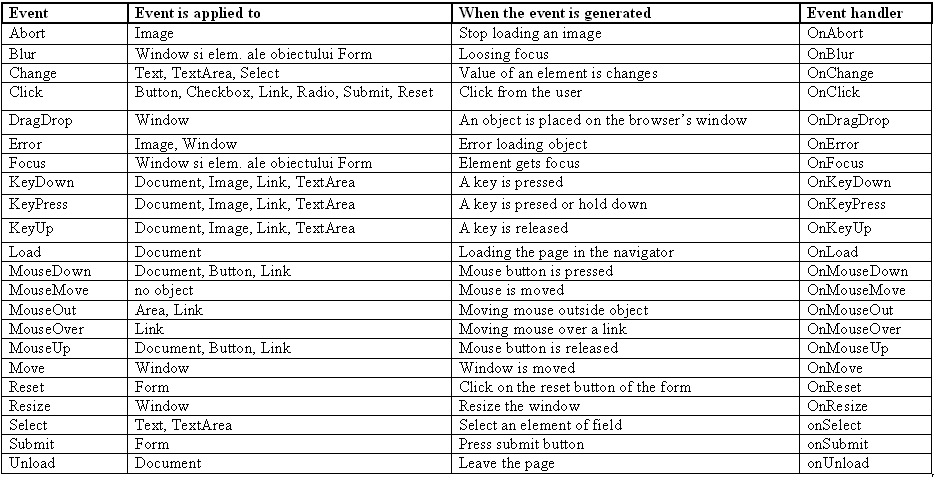
Javascript and HTML
- Js scripts can be used in HTML documents in 4 ways:
- as instructions or functions written inside a <SCRIPT> tag:
<script type="text/javascript">
... JavaScript statements...
</script> - Js code written in a separate javascript file:
<script src="common.js"></script> - using a Js expression as the value of an html attribute:
<hr width="&{barWidth};%" align="left">
<h4>&{myTitle};</h4>
JavaScript entities start with "&" and end with ";" and are enclosed in "{}" - as an event handler:
<input type="button" value="Press Me" onClick="func()">
- as instructions or functions written inside a <SCRIPT> tag:
Good way of including .js in .html file
- the following line makes the browser run the js code in script.js only after the HTML document is completely loaded:
<script src="script.js" defer></script> - this is useful when:
If this script is placed in <head>, the browser throws an error because the <button id="button"> is not loaded yet, "button" constant is null.const button = document.querySelector("#button"); button.addEventListener('click', someFunction);
Pop-up boxes
- alert("...text...") : displays text and the Ok button
- confirm("...text...") : displays text and returns true if the Ok button is clicked and false if the Cancel button is clicked
- prompt("text", "default value"): the user can enter an input value and then click Ok (return the value) or Cancel (return null)
Document Object Model (DOM)
DOM (Document Object Model)
- is a standardized (by W3C) hierarchical model of an HTML or XML document
- DOM can be used for navigating in the document structure, modify the document structure (add, delete, modify child elements etc.) and also modifying attributes of an element
- each tag is a DOM object
- it has an API which can be used in Javascript
- Javascript + DOM is sometimes called DHTML (Dynamic HTML)
Hierarchical DOM structure
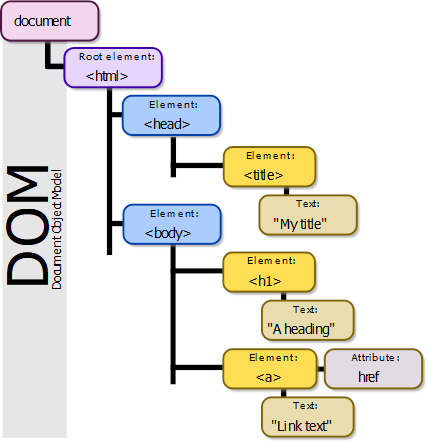 Copyright: Birger Eriksson; Wikipedia
DOM Browser Objects
- Window object
- Navigator object
- Screen object
- History object
- Location object
DOM document objects
- Document object
- Anchor object
- Area object
- Base object
- Body object
- Button object
- Event object
- Form object
- Frame object
- Frameset object
- IFrame object
- Image object
- Input Button object
- Input Checkbox object
- Input File object
Document object collections (selection)
| Collection | Description |
| forms[] | Returns a reference to all Form objects in the document |
| images[] | Returns a reference to all Image objects in the document |
| links[] | Returns a reference to all Area and Link objects in the document |
| anchors[] | Returns a reference to all Anchor objects in the document |
Document object properties (selection)
| Property | Description |
| body | Gives direct access to the <body> element |
| cookie | Sets or returns all cookies associated with the current document |
| domain | Returns the domain name for the current document |
| lastModified | Returns the date and time a document was last modified |
| referrer | Returns the URL of the document that loaded the current document |
| title | Returns the title of the current document |
| URL | Returns the URL of the current document |
Document object methods (selection)
| Method | Description |
| close() | Closes an output stream opened with the document.open() method, and displays the collected data |
| getElementById() | Returns a reference to the first object with the specified id |
| getElementsByName() | Returns a collection of objects with the specified name |
| getElementsByTagName() | Returns a collection of objects with the specified tagname |
| open() | Opens a stream to collect the output from any document.write() or document.writeln() methods |
| write() | Writes HTML expressions or JavaScript code to a document |
| writeln() | Identical to the write() method, with the addition of writing a new line character after each expression |
The Element Object. Properties
- a DOM Element represents an HTML tag
- .attributes - returns a map of all attributes of this elem.
- .children – returns a collection of children of this elem.
- .classList – returns all classes of this element
- .className – set/get the class attribute of this elem.
- .clientHeight, .clientWidth - returns height/width including padding
- .firstChild - returns first child node
- .firstElementChild – returns first child element (ignores text and comments)
- .innerHTML, .innerText – set/get the content of this elem.
- .id – set/get the ID attribute of this element
The Element Object. Properties (2)
- .lastChild - returns the last child node of this elem.
- .lastElementChild - returns the last child element of this elem. (ignores text and comments)
- .nextSibling,.previousSibling - returns the next/prev node at the same level
- .nextElementSibling,.previousElementSibling – returns the next/prev element at the same level (ignores text and comments)
- .parentNode - returns the parent node of this element
- .parentElement – returns the parent element of this element (ingnores text and comments)
- .style – set/get the style attribute of this element
The Element Object. Methods
- addEventListener(), removeEventListener() – adds/removes an event listener for this elem.
- appendChild(), removeChild() – append/remove a child to this element
- click() – simulates a mouse click on this elem.
- getAttribute(),setAttribute() – get/set attribute
- getElementsByTagName() – returns children by tag name
- getElementsByClassName() – returns children by class name
- insertBefore() – insert a new child node before existing child node of this element
- remove() – remove this element
- querySelector() - returns the first child that matches a selector
- querySelectorAll() – return all children that match a selector
document.querySelector()
- document.querySelector(selector) : returns the first element that matches the CSS "selector" list; Ex.:
document.querySelector("#first"); - document.querySelectorAll(selector) : returns all elements that matches the CSS "selector" list; Ex.:
document.querySelectorAll(".first, p.second");
Creating & removing elements (tags) dynamically
var p = document.createElement("p"); 	// create "p" tag
var text = document.createTextNode("text content");
p.appendChild(text); 	      // append text to tag "p"
p.innerHTML = "other text"; // set a new content text
var p1 = p.cloneNode();      // create copy of p
p.insertBefore(p1);	      // add another element before

p.removeChild(p.firstChild);	// remove first child of p
p.remove();			// remove p (the element itself)
Modifying elements (tags)
var section = document.querySelector("section");
section.setAttribute("class", "red-section");
section.style.background = "red";
section.innerHTML = "<p>test</p>";
section.innerText = "test";
Asynchronous programming
-
Calls function "funct" with the specified parameters after "delay" miliseconds have passed.var timeoutID = window.setTimeout(func, delay, [param1, param2, ...]) -
Clears the timeout (async function is no longer called).window.clearTimeout(timeoutID);
Asynchronous programming (promises)
const myFirstPromise = new Promise(function (resolve, reject) {
        // do something asynch which eventually calls either:
                // resolve(someValue); // fulfilled
                // or
                // reject("failure reason"); // rejected
});
Getting the returned result from a Promise
// Promises can not return anything, they just pass results to callbacks (which are specified with .then())
const p = new Promise(function(resolve,reject) {
	// the asynchronous word - just a console.log()
	console.log("Doing some work...");
	resolve("Done");
});
// without .then() you can not get the returned result from the Promise!
// we assume the Promise p is always resolved
p.then(function(result) {
	console.log(result); // just print the returned result of the Promise
})
Javascript and browser compatibility
- browser compatibility is and issue even outside javascript (html, css) → different browser show tags differently (i.e. have default styles) → the need to reduce browser inconsistencies (CSS reset or reboot packages)
- with javascript/ECMAScript, some browser implement a version of ECMAScript, other browser implement other ECMAScript versions → the need to use polyfills (js libraries that extend the functionality of the browser): Core-js, Polyfill.io and transpilers (e.g. Babel – takes a higher ECMAScript version code and converts it into a lower ECMAScript version code)
Javascript quirks
Javascript can be a very powerful language, a messy one, a language full of drama ...
Here is a small list of javascript quirks (larger list is here: https://dev.to/mkrl/javascript-quirks-in-one-image-from-the-internet-52m7):
Here is a small list of javascript quirks (larger list is here: https://dev.to/mkrl/javascript-quirks-in-one-image-from-the-internet-52m7):
0.5+0.1==0.6    → true
0.2+0.1==0.3    → false
typeof(NaN)     → number
3+"1"	        → "31"
10-"1"	        → 9
true===1        → false
true==1         → true
[ ]+[ ]         → ""
Browser API, Web API, Js libraries, Js frameworks
- Browser API – a set of javascript functions, objects & properties exposed by the browser; e.g. DOM; a list of browser APIs developed by w3c.org is here: https://www.w3.org/standards/techs/js#w3c_all
- Web API – a server-side API usually exposed through HTTP request-response; the response is usually a JSON expression
- Js library – one or more js files providing custom functions & objects that enhance the functionality of the javascript language; e.g. jQuery
- Js framework – a js library plus html & css code used to write an entire web application from scratch; inversion of control – key difference between libraries and frameworks: when calling a method from a library, the developer is in control; with frameworks control is inverted – the framework calls developer's code; e.g. Angular
Js debugging tools
- Firefox's Web Console and Chrome's Inspector
- JsFiddle (https://jsfiddle.net/)
- CodePen (https://codepen.io)