HTTP - HyperText Transfer Protocol
HTML forms
- html forms are usefull for getting different kinds of user input and sending this input to the web server
- html forms are introduced by the <form> tag
- syntax of <form>:
<form attribute=“value” ..> … text content … … input elements … </form> - input elements are described using the <input> tag
<form> attributes
- action=URL : specifies where the form-data will be sent when the form is submitted
- accept=MIME type : specifies the types of files that can be submitted through a file upload
- accept-charset=charset : specifies the character-set the serer can handle for form-data
- enctype=application/x-www-form-urlencoded, multipart/form-data, text/plain : specifies how form data should be encoded before sending it to the web server
- method=get (form-data is sent to the web server in the header of the HTTP request), post (form-data is sent to the web server in the body of the HTTP request) : specifies how to send form-data
- name=string : the name of the form
Types of user input <input type=“…”>
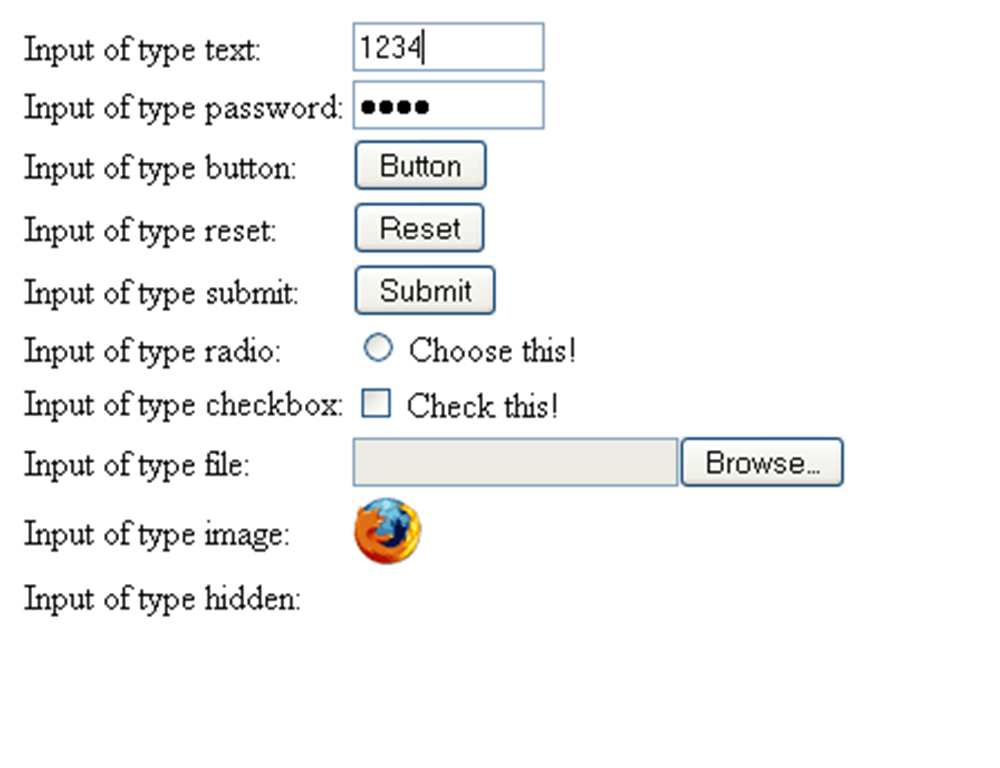
The <input> tag
- is useful for selecting user information
- receives input in various types
- has no end tag </input> in Html
- attributes:
- accept=MIME_type : for type=“file” only specifies types of files that can be submitted through a file upload
- alt=text : for type=“image” only specifies an alternate text for an image input
- checked=checked : for type=“checkbox | radio” specifies if the input should be preselected when the page loads
- disabled=disabled : specifies the input should be disabled when the page loads
- maxlength=number : for type=“text | password” specifies the maximum length in characters of the input field
- name=text : specifies the name of input element
- readonly=readonly : for type=“text | password” specifies the input field should be read-only
- size=number : the width of the input field
- src=URL : the URL of an image to display as a submit button
- type=button,checkbox,file,hidden,image,password,radio,reset,submit,text
- value=text : value of the input element
Other tags useful in <form>s
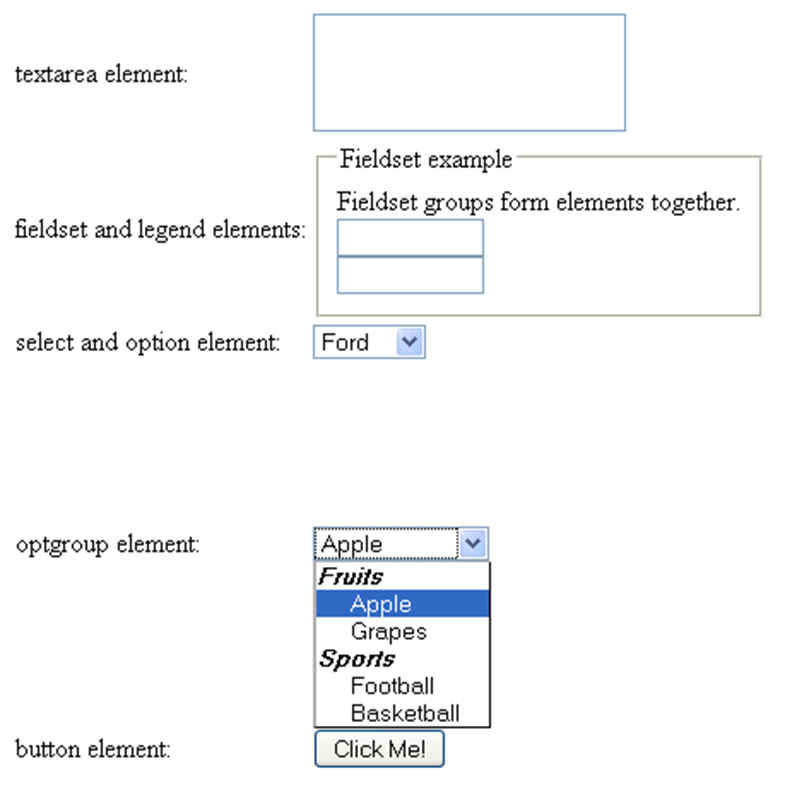
<textarea>
- defines a multi-line text input control
- can hold an unlimited no. of characters
- text is rendered in fixed-width font (usually courier)
- attributes:
- cols=number : visible number of columns in a textarea (required attribute)
- rows=number : visible numbers of rows in a textarea (required attribute)
- disabled=disabled : textarea is disabled
- readonly=readonly : textarea is readonly
- name=text : name of the textarea element
- Ex.:
<textarea rows=“2” cols=“20”>
		This is a text area..
</textarea>
<label> and <button>
- <label> does not render anything; defines a label for an input element; it toggles the control if the user clicks the text within the label
- <button> defines a push button; it can contain inside text or images (difference from <input type=“button”>)
- attributes for <button>:
- disabled=disabled : button is disabled
- name=text : name of the button
- type=button | reset | submit : type of the button
- value=text : value of the button
- Ex.:
<button type=“button”>Click me!</button>
<legend>,<fieldset> and <optgroup>
- <legend> defines a caption for a <fieldset> element
- <fieldset> groups together form elements; it draws a box around them
- Ex.:
<fieldset> <legend>Some caption</legend> <input type=”text”><br> <input type=”text”> </fieldset> - <optgroup> groups together related options in a select list
- Ex.:
<select>
     <optgroup label="Fruits">
   			<option value="apple">Apple</option>
			<option value="grapes">Grapes</option>
     </optgroup>
     <optgroup label="Sports">
			<option value="football">Football</option>
			<option value="basketball">Basketball</option>
     </optgroup>
</select>
<select> and <option>
- <select> and <option> are useful for creating a drop-down list
- Ex.:
<select> <option value="ford">Ford</option> <option value="ferrari">Ferrari</option> <option value="bmw">BMW</option> </select> - attributes of select:
- disabled=disabled : list is disabled
- multiple=multiple : multiple selections are possible
- name=text : name of the element
- size=number : no. of visible options in the list
- attributes of option:
- disabled=disabled : this option is disabled
- selected=selected : this option is selected by default
- value=text : value that will be sent to the server when the form is submitted
Sets of characters in HTML
Most browsers support:
- ASCII character set (see http://www.w3schools.com/tags/ref_ascii.asp)
- ISO-8859-1 character set (see http://www.w3schools.com/tags/ref_charactersets.asp)
- Math, greek and other symbols (see http://www.w3schools.com/tags/ref_symbols.asp)
URL – Uniform Resource Locator
- an URL identifies a resource in the WWW
- URLs are a subset of URIs (Uniform Resource Identifiers); URL=URI that provides the location for a resource
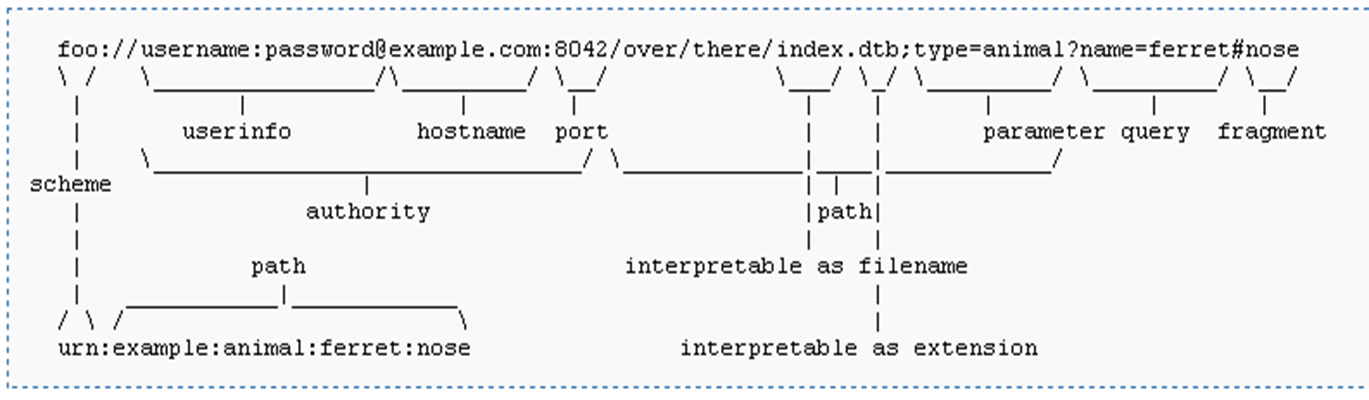
- general form of a URL:
resource_type://domain:port/filepathname?querystring#anchor- resource_type : the scheme name (protocol) which defines the namespace, syntax and remaining part of URL
- domain : registered domain name or IP address of location (case-insensitive)
- port : port number (optional, default for scheme is used)
- filepathname : path to the resource/file on the server (usually case-sensitive)
- querystring : data submitted to the server through forms
- anchor : a specific location inside that document
URL examples
- http://www.google.com
- ftp://ftp.opensuse.com/dist/11.1/
- https://www.cs.ubbcluj.ro/~forest/HtmlFolder/ac/index.html
- http://www.google.com/firefox?client=firefox-a&rls=org.mozilla:en-US:official
- http://cs.ubbcluj.ro/index.php?view=2&size=default
- http://www.java.sun.com/index.html#j2me
URI – Uniform Resource Identifier
Web communication
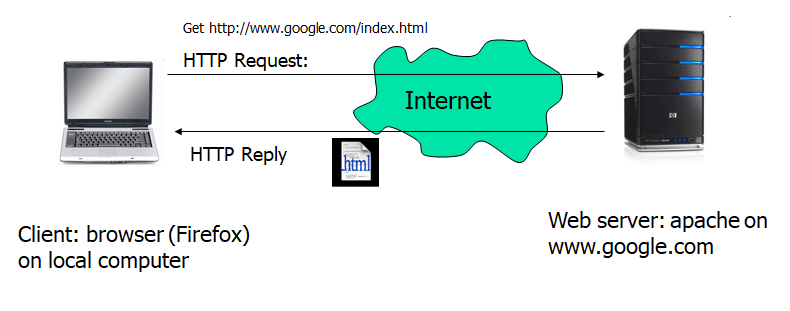
HTTP – HyperText Transfer Protocol
- together with HTML forms the base of WWW
- is standardized by IETF (rfc 2616)
- is a request-response protocol
- it is stateless (does not maintain a state of a session) and asynchronous (an html document is loaded asynchronous by the browser, as soon as parts of it are available)
- latest version is HTTP/1.1
- runs on top of TCP on the standardized port 80
HTTP Request
- has the form:
Request-Method SP Request-URL SP HTTP-Version <CR><LF>
(generic-header | request-header | entity-header <CR><LF>)
<CR><LF>
[message body] - Request-Method is:
- GET – request whatever information is identified by the Request-URL
- POST – request that server accepts the entity enclosed in the request
- OPTIONS - request for information about communication options
- PUT – request that the enclosed entity be stored under the Request-URL
- DELETE – request that the server delete the resource identified by Request-URL
- TRACE – invoke a remote, application-layer loopback of the request message
- CONNECT – used by proxies in SSL connections
- HEAD – identical to GET, but server must not return a message body in response
HTTP Request (2)
- Request-header can have the following fields (selection):
- Accept : MIME types of resources accepted by browser
- Accept-Charset : charset accepted by browser
- Accept-Encoding : encoding accepted by browser
- Accept-Language : language accepted by browser
- Authorization : user-agent wishes to authenticate itself with a server
- Host : the host Request-URL points to
- Referer : the URL of document refering this URL
- User-Agent : Firefox, Safari, IE
HTTP Response
- has the form:
Http-Version SP Status-Code SP Reason-Phrase<CR><LF>
(generic-header | response-header | entity-header <CR><LF>)
<CR><LF>
[message body] - Response-header has the following fields (selection):
- Age : sender’s estimate of the amount of time since the response was generated by server
- Location : redirect the client to a location other than Request-URL for completion of the request
- Retry-After : indicate to client how long the service is expected to be unavailable
- Server : information about software used by the server to handle the request
HTTP Request example
Get http://www.google.com HTTP/1.1
Host: www.google.com
User-Agent: Mozilla/5.0 (Windows; U; Windows NT 5.1; en-US; rv:1.9.1.3) Gecko/20090824 Firefox/3.5.3 (.NET CLR 3.5.30729)
Accept: text/html,application/xhtml+xml,application/xml;q=0.9,*/*;q=0.8
Accept-Language: en-us,en;q=0.5
Accept-Encoding: gzip,deflate
Accept-Charset:	ISO-8859-1,utf-8;q=0.7,*;q=0.7
Keep-Alive: 300
Connection: keep-alive
Cookie:PREF=ID=141ca2d4581746b4:U=f22e9e94ccc4a56f:FF=4:LD=en:NR=10:CR=2:TM=1249567334:LM=1251146058:GM=1:S=qWowBrte7hrXniGp; NID=27=n9Khexo85YHnovw93wK4qC2lZtGa1DnzVQEB6iul9tn62fsJ7gFuMVK252ceLCD3iS54r-nHD6kWDdD1JP77akDhMl0EWzoTbPt3cM5g8mapG9SskdRSyEyLWcJK1LrX
Cache-Control: max-age=0
HTTP Response example
HTTP/1.1 200 OK
Date: Tue, 13 Oct 2009 05:27:42 GMT
Expires: -1
Cache-Control: private, max-age=0
Content-Type: text/html; charset=UTF-8
Content-Encoding: gzip
Server: gws
Content-Length: 3667
X-XSS-Protection: 0