---------------------------Syntax brief------------------
Variables:
MY_MESSAGE="Hello World"
echo $MY_MESSAGE
When variables are used they are referred to with the $ symbol in front of them. There are several useful variables available in the shell program. Here are a few:
$$ = The PID number of the process executing the shell.
$? = Exit status variable.
$0 = The name of the command you used to call a program.
$1 = The first argument on the command line.
$2 = The second argument on the command line.
$n = The nth argument on the command line.
$* = All the arguments on the command line.
$# The number of command line arguments.
The "shift" command can be used to shift command line arguments to the left, ie $1 becomes the value of $2, $3 shifts into $2, etc. The command, "shift 2" will shift 2 places meaning the new value of $1 will be the old value of $3 and so forth.
Evaluating expressions:
expr $x + 1
echo `expr 6 + 3`
quotes, backtics, ...
For e.g.
$ echo "expr 6 + 3" # It will print expr 6 + 3
$ echo 'expr 6 + 3' # It will print expr 6 + 3
$ echo `expr 6 + 3` # prints 9
$ echo `expr 6+3` # prints expr 6+3
$ echo `expr 6+ 3` # prints syntax error
If/for/while statements
Example: ===============================
#!/bin/sh
a=10
b=20if [ $a == $b ]
then
echo "a is equal to b"
elif [ $a -gt $b ]
then
echo "a is greater than b"
elif [ $a -lt $b ]
then
echo "a is less than b"
else
echo "None of the condition met"
fi
===================================
for
------
Example: ========================
for arg in $*; do
if [ -f $arg ]; then
echo "$arg is a File"
fi
done
===========================
while/do
--------
while [ 1 ]
do
statement(s)
done
test expression
-------------------
-d file = True if the file exists and is a directory.
-f file = True if the ile exists and is a regular file
-p file = True if the file exists and is a named pipe.
-r file = True if the file exists and is readable.
-w file = True if the file exists and is writable.
-x file = True if the file exists and is executable.
-z string = True if the length of the string is 0.
-n string = True if the length of the string is non-zero.
string1 = string2 = True if the strings are equal.
string1 != string2 = True if the strings are not equal.
!expr = True if the expr evaluates to false.
expr1 –a expr2 = True if both expr1 and expr2 are true.
expr1 –o expr2 = True is either expr1 or expr2 is true.
The syntax is :
arg1 OP arg2
where OP is one of –eq, -ne, -lt, -le, -gt, or –ge. Arg1 and arg2 may be positive or negative integers or the special expression "–l string" which evaluates to the length of string.
read
-----
#!/bin/bash
echo -n "Enter some text > "
read text
echo "You entered: $text"
========================================================================================
MORE ABOUT SHELL SINTAX AND EXAMPLES HERE: http://www.cs.ubbcluj.ro/~alinacalin/SO/Labs/Lab%20SHELL%201.pdf
ADVANCED EXAMPLES and about [ ] [[ ]] and (( )) : http://www.cs.ubbcluj.ro/~alinacalin/SO/Labs/Lab%206%20SHELL%202.pdf
========================================================================================
-----------------------------Problems---------------------------
0. Write in cmd line:
echo "Hello `whoami`!"
1. Write a Hello world shell script with vim / other text editor
---------hw.sh--------
#!/bin/sh
echo 'Hello,'$1;
----------------
Give the script execution permissions
chmod +x hw.sh
or
chmod 755 your-script-name
Execute the script with argument 1 your name
./hw.sh John
or
sh hw.sh John
Hello, John
2. Write a shell script to compile and run a C program.
- write a program in C program.c
- create file hello.sh to contain:
----------------------------------------
#!/bin/sh
gcc -Wall -o out program.c # this line compiles the program. If there are errors, they will be printed out and ./out will run the previous successful compilation
./out # run the executable output only if the above line was successful (no compile errors; warnings should also be resolved, although the program is compiled)
---------------------------------------
chmod +x hello.sh
./hello.sh
- or better:
-------compile.sh---------------
#!/bin/sh
if gcc -o myprog $1
then ./myprog $*
else echo "Erori de compilare"
fi
---------run as: ./compile.sh codefile.c -------------
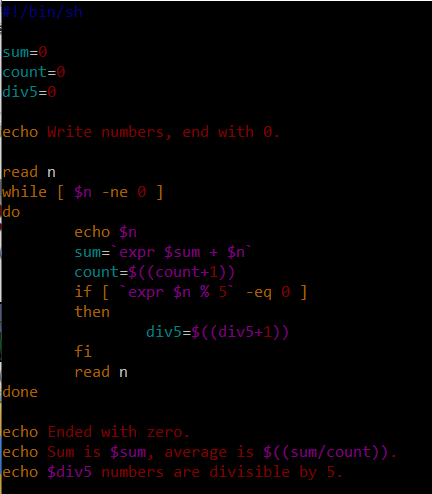
3. Write a shell script that reads numbers until 0 and computes the sum, average of the numbers and counts how many are multiples of 5.
4. Write a script that reads filenames and check for each file how many words contains on the first line and the size of the file.
5. Same as 4 but input by command line arguments(ex. ./script.sh file1.txt notanexistingfile file4.sh )
6. Sort files given as command line arguments in ascending order according to file size.
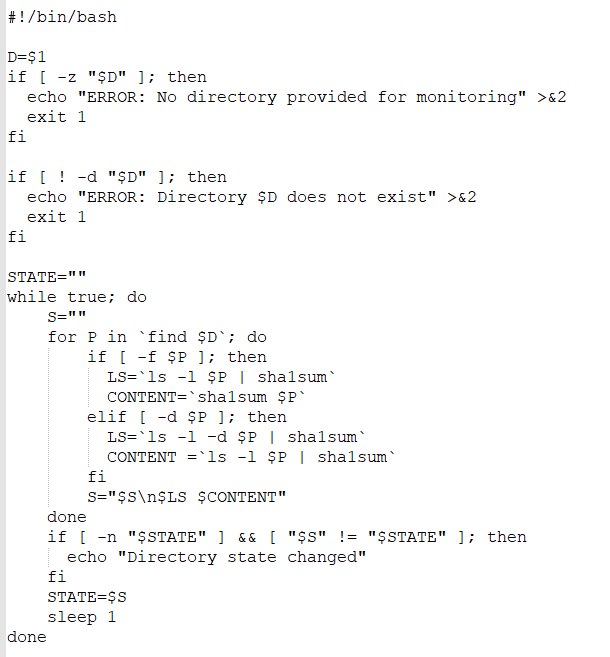
7. Pb from seminary: Write a script that monitors the state of a directory and prints a notification when something changed:
==================== MORE EXERCICES =====================
Write a shell script that, for all the users in /etc/passwd, creates a file with the same name as the username and writes in it all the ip addresses from which that user has logged in. (hint: use the last command to find the ip addresses).
Write a shell script that for each command line parameter will do:
- if it’s a file, print the name, number of characters and lines in the file
- if it’s a directory, print the name and how many files it contains (including subdirectories files)
Write a shell script that receives as argument a natural number N and generate N text files:
- the name of the files will be of the form: file_X, where X={1,2,…, N}
- each generated file will contain online lines between X and X+5 of the file /etc/passwd
15. Write a script that finds recursively in the current folder and displays all the regular files that have write permissions for everybody (owner, group, other). Then the script removes the write permissions from everybody.
HOMEWORK & MORE PRACTICE PROBLEMS FOR SHELL PRACTICAL EXAM :
=======================
Verify if a variable is number:
Method 1:
if echo "$var" | egrep -q '^\-?[0-9]*\.?[0-9]+$'; then
echo "$var is a number"
else
echo "$var is not a number"
fi
Method 2:
#!/bin/bash
var=a
if [ "$var" -eq "$var" ] 2>/dev/null; then
echo number
else echo not a number
fi
----------------------------
Use in Bash the ‘-x’ (xtrace) option: displays commands when performing an execution trace
sh -x script.sh arg1 arg2
Using arrays in shell:
